AI Agent Render Pipeline Automation in Blender
An AI agent can now verify its own render output while artists keep creative control.
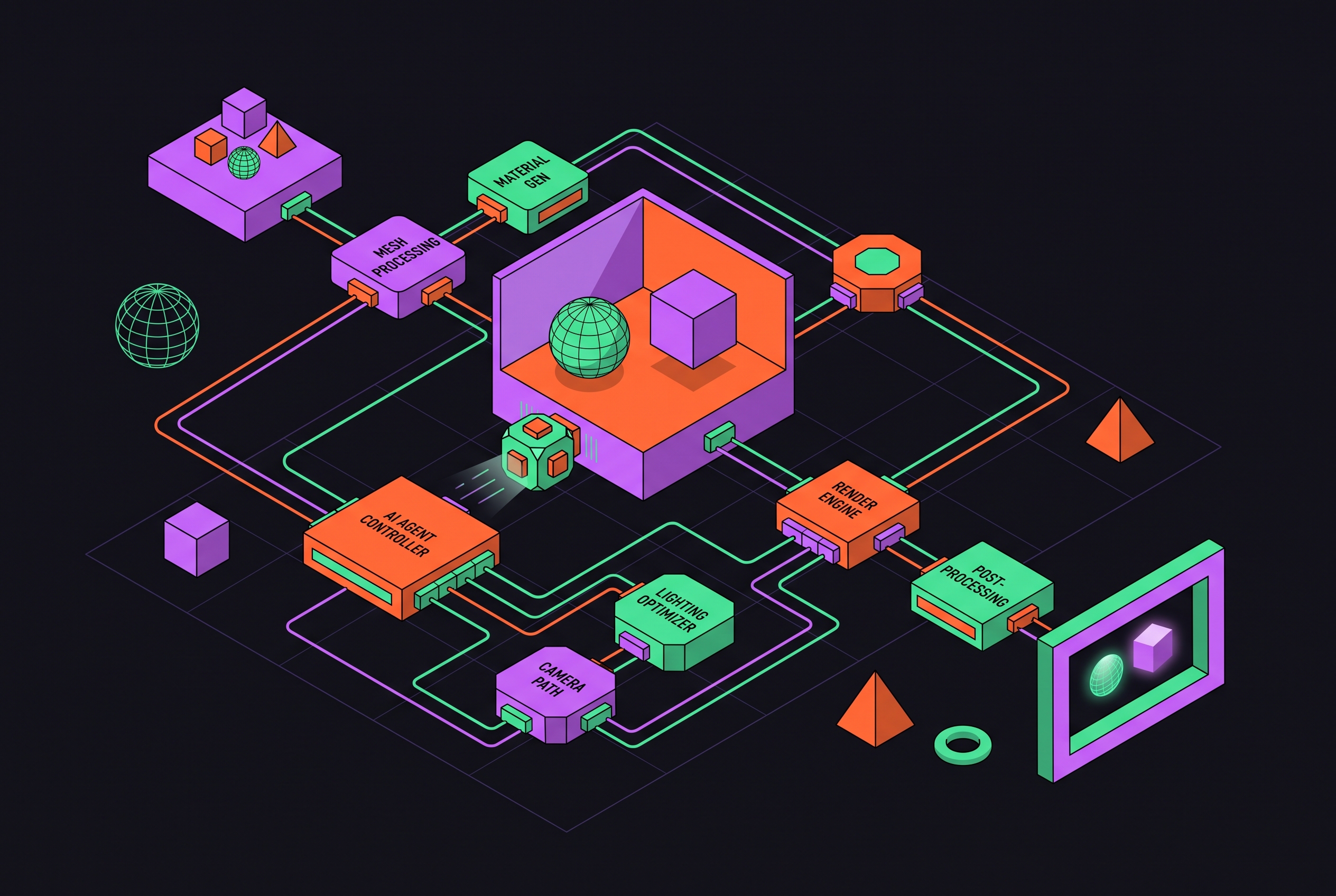
AI agent render pipeline automation in Blender has to finish render jobs, which takes more than Python that looks right. With MCP, headless execution, reusable skills, and project memory, an agent can configure a scene, run a batch, and check the files it produced. The useful shift is a closed loop that verifies its own output, while leaving artistic judgment with people.
Why Blender's render pipeline resisted automation until now
Blender’s open Python API, bpy, has always been capable of executing everything the GUI can. Access was never the main obstacle. The hard part was translating an artist’s intent into the right calls across a sprawling, version-sensitive API. A script could work once yet remain too fragile to become a dependable workflow, sending its author back to clicking through settings.
Rendering concentrates that fragility because several dependent choices must line up. Engine selection, camera targeting, output paths, and frame sequencing are individually scriptable, but a mistake in any of them can spoil the result. One-shot scripts often leave the artist with another job, checking the output.
The Model Context Protocol, or MCP, changes the connection. It lets an AI client run bpy commands, read scene state, and act on what it finds, so it can do more than hand over code and stop. Blender’s official Lab MCP Server, available in Blender 5.1 or later, makes that connection a platform-supported feature.
What "agentic" means in a Blender render context, and why it differs from script generation
An agentic workflow runs Blender, observes the result, and decides what happens next. Better Python is not the defining difference. The command blender scene.blend --background --python script.py gives the agent a repeatable terminal operation with evidence to inspect. It can check whether the command exited cleanly, whether the output directory exists, and whether the expected PNG sequence appeared.
That evidence changes the definition of done. A render skill requires explicit engine configuration, resolution, output format, cameras, lights, and materials, followed by an actual render and a file at the expected path. A plausible script does not satisfy that contract. The agent must report what ran, where the output went, and what still needs review.
A wrong engine name or a setting left incomplete can stop a run, while finding an empty camera view takes more than checking that a file exists. Missing frames can be counted and their ranges rerun. Using this loop from scene setup through delivery joins the separate scripting tasks into one pipeline.
The full render pipeline an agent can own, step by step
The job begins with scene inspection and camera setup. The agent identifies or creates cameras, aims them at the subject, sets focal length, and assigns clear names. Hero, front, side, and top views become repeatable configurations. The agent sets up lighting in the same way and applies materials before rendering.
Next, the agent selects the engine and output settings. Cycles suits physically accurate final stills, while EEVEE suits fast layout checks and previews. Background execution adds a practical constraint here. EEVEE needs a working OpenGL context, so a server without a display needs Cycles or a virtual display. Before the render call, the agent must set denoising, choose the GPU through --cycles-device, and set the resolution and format.
The blender-render-automation skill shows how to render a batch of cameras with a Python loop. It iterates over camera objects, makes each active, assigns an output filepath keyed to its name, and renders. Each view therefore has an expected destination. For animation, image sequences keep the work already done if rendering fails at frame 87, so frames 1–86 are still there while the agent reruns the missing range.
Verification closes the sequence before FFmpeg assembles the video. The agent checks the paths and frame counts against the range asked for, then reports any gaps and anything that needs review. Execution is only part of the job. The deliverable is the rendered output.
Agent skills as the mechanism that makes the pipeline repeatable
A skill packages the rules that an agent would otherwise improvise. It combines API knowledge with safe defaults, operation order, and a definition of done. This makes a pipeline reusable across sessions and operators. Without those rules, even an agent that can inspect its mistakes must repeatedly rediscover how to avoid them.
The OpenClaw Blender skill addresses transform application, modifier order, UV seam handling, and export settings for game engines. These are guardrails against recurring production errors. A render skill serves the same role when it makes camera setup and engine configuration explicit prerequisites. The agent still responds to the scene, but it does so within an established procedure.
A demonstration can depend on the agent making every choice correctly once. A skill records which choices must be made and what evidence finishes the task. Its value lies in reducing how much the next run depends on fresh improvisation.
Persistent memory as the mechanism that prevents the pipeline from resetting every session
Skills describe the procedure, but project memory supplies the conventions. A fresh agent does not know the target engine, scale convention, UV channel layout, material slot order, or rig naming quirks. Those assumptions are easy to leave unstated. Y-up versus Z-up, metres versus centimetres, lightmap channel names, and collision mesh conventions can all change what a correct operation looks like.
The persistent-kb pattern gives the agent a project-scoped knowledge base to read at the start of each session. It holds the details the artist would otherwise repeat, including camera names, target frame ranges, and render settings that worked on the machine. This procedural knowledge tells the agent how this project is handled.
Voyager’s adaptive workflow memory applies this pattern across models and sessions, so routing a render task to Claude or another model does not require reconstructing the project’s conventions. Together, they let a new session begin with more than the current prompt.
Where the pipeline breaks down: timeout limits, topology gaps, and context cost
Long-running operations can outlast the agent’s MCP tool-call window. Work with lots of subdivision, complex remeshing, and high-resolution baking may keep running in Blender after the call times out. Waiting longer is not always an available fix. The workaround is to dispatch the operation as a background headless process and inspect its output separately.
Geometry quality imposes a different limit. Agents assembling primitives and modifiers suit hard-surface and procedural work, but they cannot match an experienced artist’s intentional edge flow and deformation-friendly topology for organic subjects. A dedicated 3D generator or human artist can make the asset while the agent works on the scene around it. The 2026 arXiv paper on the Planner-Actor-Critic framework found that modeling results were better when critic-guided reflection was used with human supervision than when a single prompt was run directly. It does not show that an agent can keep revising on its own in place of a person checking the work.
In long sessions, each operation and each look at the scene also uses up context. An agent can lose track of work it already executed, making scripts that are safe to run twice a production requirement. Project memory cuts down on what has to be explained again, but context still gets used up. These constraints define the handoff points, first between local and cloud execution, then between agent work and human judgment.
Cloud render farms with agent-native APIs and when to use them
Local headless rendering is enough for most development and preview work. Frame-heavy or high-resolution production sequences can need cloud GPUs, but compute capacity alone is not enough. The agent also needs an interface it can drive. A studio farm and a hosted MCP service thus meet different needs.
JANCTION Render offers remote MCP with OAuth and no sign-up required. Its MCP consent page or a POST to /v1/keys issues a key, with welcome credit per new key (time-limited), then previews free up to 2 GPU-minutes a day. Prepaid credit costs 0.1 JPY per GPU-second, larger top-ups receive a percentage bonus, and the minimum charge is 1 JPY. It uses one NVIDIA RTX PRO 6000 (96 GB), with a per-instruction frame limit, 1080p on free time, and higher resolutions on prepaid credit.
The service accepts.blend, bpy script, glTF/GLB, FBX, USD, OBJ, STL, PLY, and Alembic. Outputs include PNG/EXR frames plus MP4, WebM, ProRes, GIF, and WebP. Its preview loop tiles a small number of frames into one image in seconds and returns a critic verdict of ok / check / fix with fix code. This works well for an agent that needs a render right away. However, work past the per-instruction frame limit needs splitting or a many-GPU farm, and the service has no SLA. Scenes and results are deleted after a short window following last use, with somewhat longer retention for keys that have topped up, so it does not suit projects edited across days.
Sceneplane instead provides saved cloud projects through remote MCP with API key or OAuth. It offers free compute-minutes a month and tiered paid plans for greater compute-minutes, with moderate resolution on the free tier and higher resolutions on paid plans. Outputs include renders, MP4, GLB, STL, and.blend. Saved projects are its relevant distinction here. For hundreds of high-resolution frames across many GPUs, BlendSwap Render Farm fits when per-GPU-hour billing is acceptable. A Modal or RunPod worker suits teams able to maintain the Blender container and connecting code, while local Blender MCP suits an open scene on a capable NVIDIA GPU. RebusFarm, GarageFarm.NET, and Fox Renderfarm serve long sequences needing studio support, but expose no public agent API.
What to hand to the agent and what to keep human-controlled
The useful boundary gives agents repeatable, verifiable work and gives people intentional artistic decisions. For batch asset processing, that means agent-run re-origining, re-scaling, decimation, AO baking, material-slot swaps, UV renaming, and target-format exports. For background props and modular kits, agents can also create the lightmap-channel and handle smart UV projection and island packing. These tasks have concrete settings and checkable outputs.
Procedural variation belongs on the agent side too. A base mesh can receive modifiers with seeded randomization and produce distinct variants as separate files. The agent can also run renders and set up the scene around finished assets. The human sets the intent while the agent performs the repeatable operations.
People should keep control of hero-asset topology, character edge flow, joint placement, and artistic UV seams. A person should also review the work and reset long critique-revision loops to keep the agent from going on endlessly. Operations that exceed MCP timeouts and cannot run as background headless processes need a human-controlled handoff. Across delegated work, scripts must be idempotent, meaning safe to execute twice. A custom property marker that skips already-processed assets prevents reruns from double-scaling, double-exporting, or corrupting completed work.
Building the pipeline: a practical starting point for a solo creator or small studio
A practical pipeline begins with the smallest setup that makes execution observable. Begin with headless Blender, a render skill, output verification, and one project-scoped knowledge base. The blender-render-automation skill has written steps to get started with Cycles/EEVEE configuration, camera setup, batch rendering, and background operation. Its definition of done gives the agent something concrete to test.
Then populate the persistent-kb with the engine target, scale convention, UV channel names, output format, camera naming pattern, and rig-specific quirks. This is the upfront work that prevents repeated explanation. For model routing, use a Blender-aware skill with a frontier model to write scripts and run renders, and use a dedicated text-to-3D tool to generate the mesh beforehand where it fits the job.
Voyager’s open multi-model dashboard supports Claude, ChatGPT, Kimi, DeepSeek, and other frontier models, with shared project context for task routing. Its free monthly credits provide room to try different model-task pairings. Cloud rendering can wait until local GPU capacity becomes the bottleneck. JANCTION Render’s no-sign-up free preview offers an entry point for iteration checks, while BlendSwap Render Farm or a Modal worker suits work that outgrows local execution. The test is concrete output at expected paths, matching frame counts, and a report that distinguishes what the agent verified from what still needs human review.